Data policies
Kpow supports configurable redaction of Data inspection results with Data policies.
Data policies are defined in a YAML file and configured with an environment variable:
DATA_POLICY_CONFIGURATION_FILE=/path/to/masking/config.yml
Data policies are a declarative way of defining how redactions are applied to query results (both Data Inspect and ksqlDB queries).
Kpow supports redactions on both the key, value and header attributes of records and supports redaction of scalar types (eg: strings) or within structured data types (eg: maps, collections).
Structured data redaction currently supports Protobuf, AVRO, JSON, Transit, and EDN data formats as well as Custom SerDes with JSON format.
String SerDes are removed from Data inspect when Data policies are configured as they could be used to circumvent redaction.
Exclusions
Define exclusions: in your Data policies YAML file to exclude specific topics from redaction and allow them to be inspected with String SerDes.
exclusions:
  topics: ["tx_meta", "tx_metrics"]
Data policies
The YAML configuration defines policies, each policy contains:
name: the unique name of the data policyresources: the resources governed by the policycategory: the category for this policyredaction: the redaction function to be appliedtype: the type of data (eitherscalarornon-scalar)fields: the fields to redact fornon-scalardata
Example YAML
Example: A Credit Card policy that shows only the last four digits of specific fields in all topics.
policies:
  - name: Credit Card
    category: PII
    resources:
      - [ 'cluster', '*', 'topic', '*', 'value']
    redaction: ShowLast4
    type: non-scalar
    fields: [ credit_card, creditcard, pan ]
Resource
Resources are defined through a taxonomy that describes the hierarchy of objects in Kpow:
[DOMAIN_TYPE, DOMAIN_ID, OBJECT_TYPE?, OBJECT_ID? OBJECT_RESOURCE?]
Where:
DOMAIN_TYPE: alwaysclusterfor data policiesDOMAIN_ID: the ID of the cluster or*for all clusters.OBJECT_TYPE: alwaystopicfor data policiesOBJECT_ID: the name of the topic or*for all topics.OBJECT_RESOURCE: (optional) eitherkey,headersorvalue
Specifying a topic, key, or value is optional.
Example resources
| Resource | Effect | Implications |
|---|---|---|
["cluster", "*"] | All clusters and topics | The data policy is applied to every key and value on every topic in every cluster |
["cluster", "*", "topic", "*'] | All clusters and topics | The data policy is applied to every key and value on every topic in every cluster |
["cluster", "*", "topic", "*", "value"] | Only the values on all clusters and topics | The data policy is applied to every value on every topic in every cluster |
["cluster", "MyCluster"] | All topics for a specific cluster | The data policy is applied to every key and value in every topic on a specific cluster |
["cluster", "*", "topic", "MyTopic"] | Keys and values on a specific topic on all clusters | The data policy is applied to every key and value in a specific topic on every cluster |
["cluster", "*", "topic", "MyTopic", "value"] | Only the values on a specific topic on all clusters | The data policy is applied to every value in a specific topic on every cluster |
["cluster", "*", "topic", "MyTopic", "key"] | Only the keys on a specific topic on all clusters | The data policy is applied to every key in a specific topic on every cluster |
["cluster", "*", "topic", "MyTopic", "headers"] | Only the headers on a specific topic on all clusters | The data policy is applied to every header in a specific topic on every cluster |
Redaction functions
Supported redaction functions include:
| Redaction | Description | Example Data | Example Result |
|---|---|---|---|
| Full | Fully redact the matched value | John Smith | ************ |
| SHAHash | Apply a SHA512 hash to the value | John Smith | ed014a19bb67a.. |
| ShowEmailHost | Show the email host | johnsmith@corp.org | *********@corp.org |
| ShowEmailPart | Show first character and host | johnsmith@corp.org | j********@corp.org |
| ShowFirst | Show the first character | John Smith | J********* |
| ShowFirst2 | Show the first two characters | John Smith | Jo******** |
| ShowFirst4 | Show the first four characters | John Smith | John****** |
| ShowFirst6 | Show the first six characters | John Smith | John S**** |
| ShowLast | Show the last character | John Smith | *********h |
| ShowLast2 | Show the last two characters | John Smith | ********th |
| ShowLast4 | Show the last four characters | John Smith | ******mith |
| ShowLast6 | Show the last six characters | John Smith | **** Smith |
Nested redaction
Kpow supports redaction of nested data structures.
Example: Applying the example Credit Card policy to a JSON message.
{
  "user_details": {
    "email_address": "a@user.com",
    "payment_options": [
      { "credit_card": "376953644924215" }
    ]
  }
}
The data is masked accordingly when displayed in Data inspect search results:
{
  "user_details": {
    "email_address": "a@user.com",
    "payment_options": [
      { "credit_card": "***4215" }
    ]
  }
}
Kpow is conservative when applying data policies. Given a field where the selected redaction function cannot apply, the fallback is to use the Full redaction policy, e.g:
{
  "user_details": {
    "email_address": "a@user.com",
    "payment_options": [
      {
        "credit_card": {
          "pan": "376953644924215",
          "expiry": "10/10/2010"
        }
      }
    ]
  }
}
Applying the same Credit Card policy to this data incurs a Full redaction at the credit_card field as Kpow does not know how to apply the configured "ShowLast4" redactor to a structured value (in this case a map with "pan" and "expiry" fields).
The result is effectively truncated:
{
  "user_details": {
    "email_address": "a@user.com",
    "payment_options": [
      { "credit_card": "***" }
    ]
  }
}
Data policy sandbox
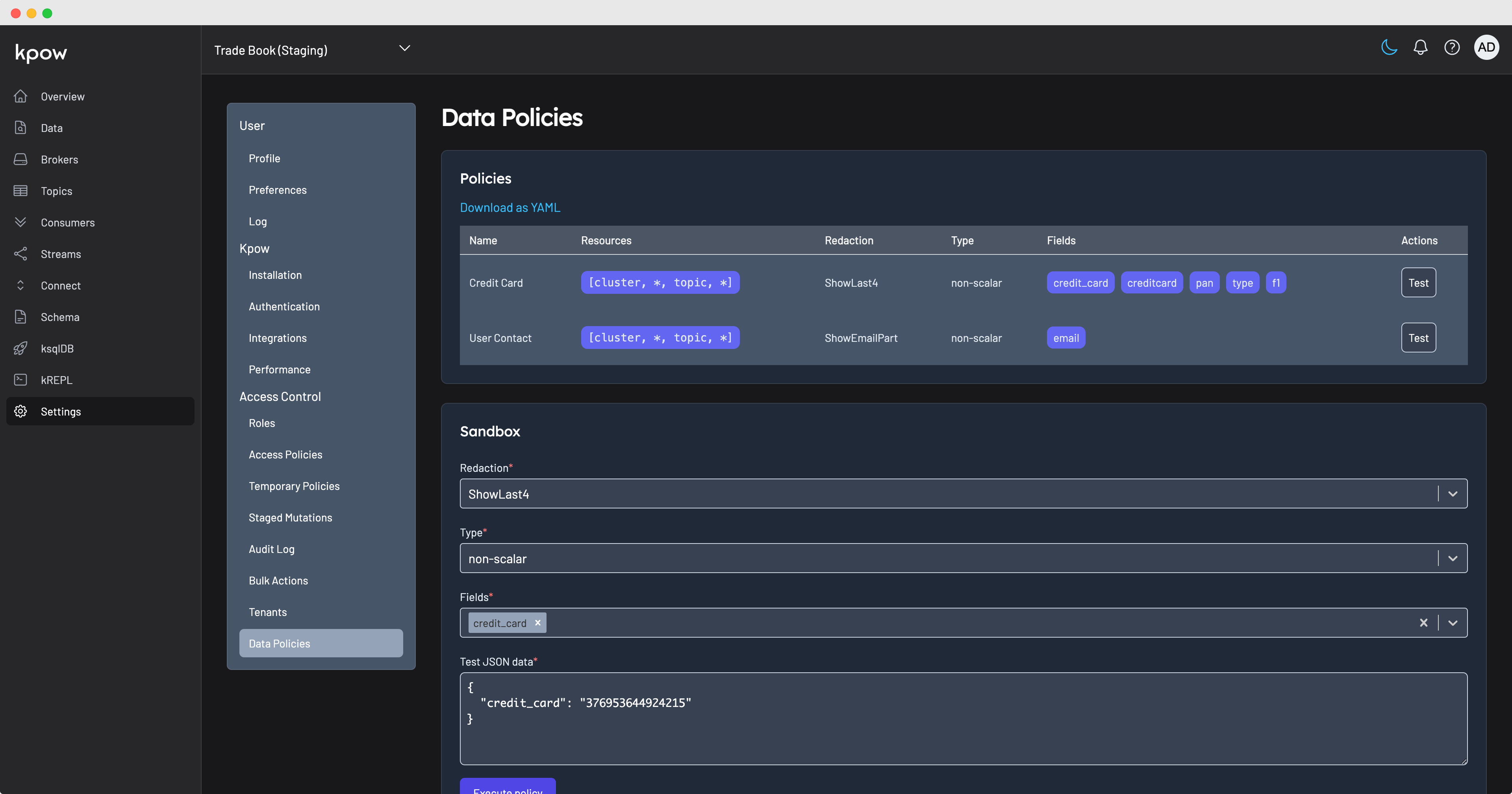
Kpow comes with a built in Data policy sandbox to experiment with your currently configured policies or to create and test new configuration.
To access the Data policy sandbox navigate to Admin -> Data policies
Troubleshooting
If you see this error:
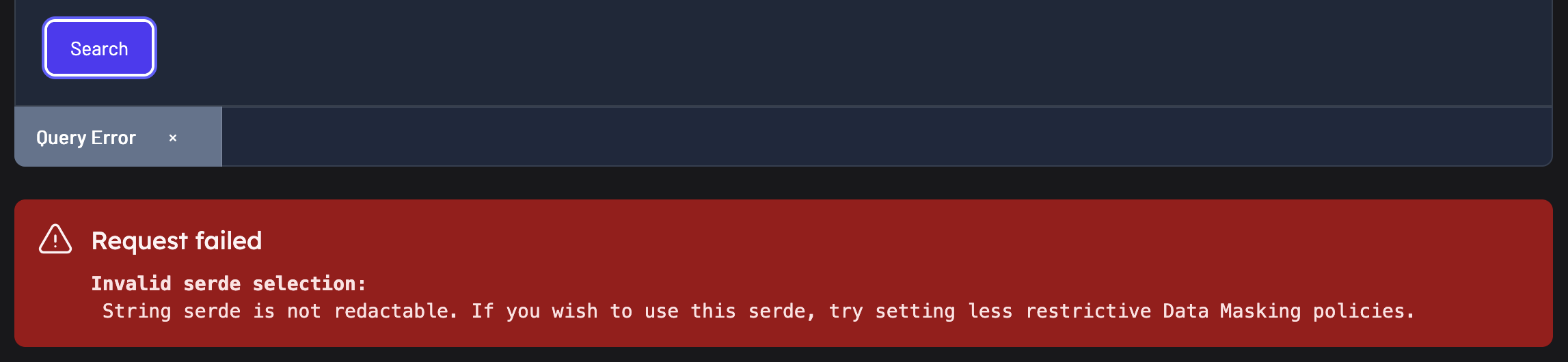
You may have applied a JSON masking policy to a string field. For example, you have a data masking policy to apply to JSON values, but you have applied it to keys and values
  - name: Credit Card
  category: PII
  resources:
    - [ 'cluster', '*', 'topic', '*']
  redaction: ShowLast4
  fields: [ credit_card, creditcard ]
If your intent is to have unmasked key strings only apply the policy to the values
  - name: Credit Card
  category: PII
  resources:
    - [ 'cluster', '*', 'topic', '*', 'value']
  redaction: ShowLast4
  fields: [ credit_card, creditcard ]
If you do want the keys masked, and they are strings, you may want to change to a scalar masking policy on the keys
  - name: Protected Key Strings
  type: scalar
  resources:
    - [ 'cluster', '*', 'topic', 'Protected Key Strings Topic', 'key']
  redaction: SHAHash